Perspectives
Rethinking the SDLC with AI in the Google Ecosystem
This article explores how AI tools across the Google ecosystem—Gemini, NotebookLM, Stitch, and AI Studio—are reshaping the SDLC into a continuous, connected workflow. Instead of handoffs between requirements, design, and engineering, teams can now move faster by validating ideas through executable prototypes. A practical look at how to reduce context loss, accelerate learning, and shift from writing specs to orchestrating systems.
Rethinking the SDLC with AI in the Google Ecosystem
How Gemini, NotebookLM, Stitch, and AntiGravity are transforming Product Managers into orchestrators of living, breathing product lifecycles.
Introduction: From Linear Paths to Fluid Loops
For decades, the Software Development Life Cycle has carried a quiet, persistent disease: "lost in translation" syndrome. A product manager writes a requirements document. A designer interprets it into mockups. A developer interprets the mockups into code. At each handoff, fidelity degrades. Intent gets diluted. Edge cases slip through the cracks. By the time the feature ships, it often resembles the original vision the way a game of telephone resembles the original phrase.
The traditional SDLC—whether waterfall, agile, or some hybrid—was built on the assumption that humans must manually bridge every gap between thinking and building. Requirements were documents. Designs were static files. Code was written line by line. Each phase was a discrete artifact thrown over the wall to the next team.
In 2026, that wall is dissolving.
AI is no longer just a "copilot"—an autocomplete engine sitting inside your IDE. It has become the connective tissue of the entire product lifecycle. It reads your research. It generates your designs. It scaffolds your code. It deploys your prototypes. And critically, it maintains context across all of these phases in a way that no human handoff document ever could.
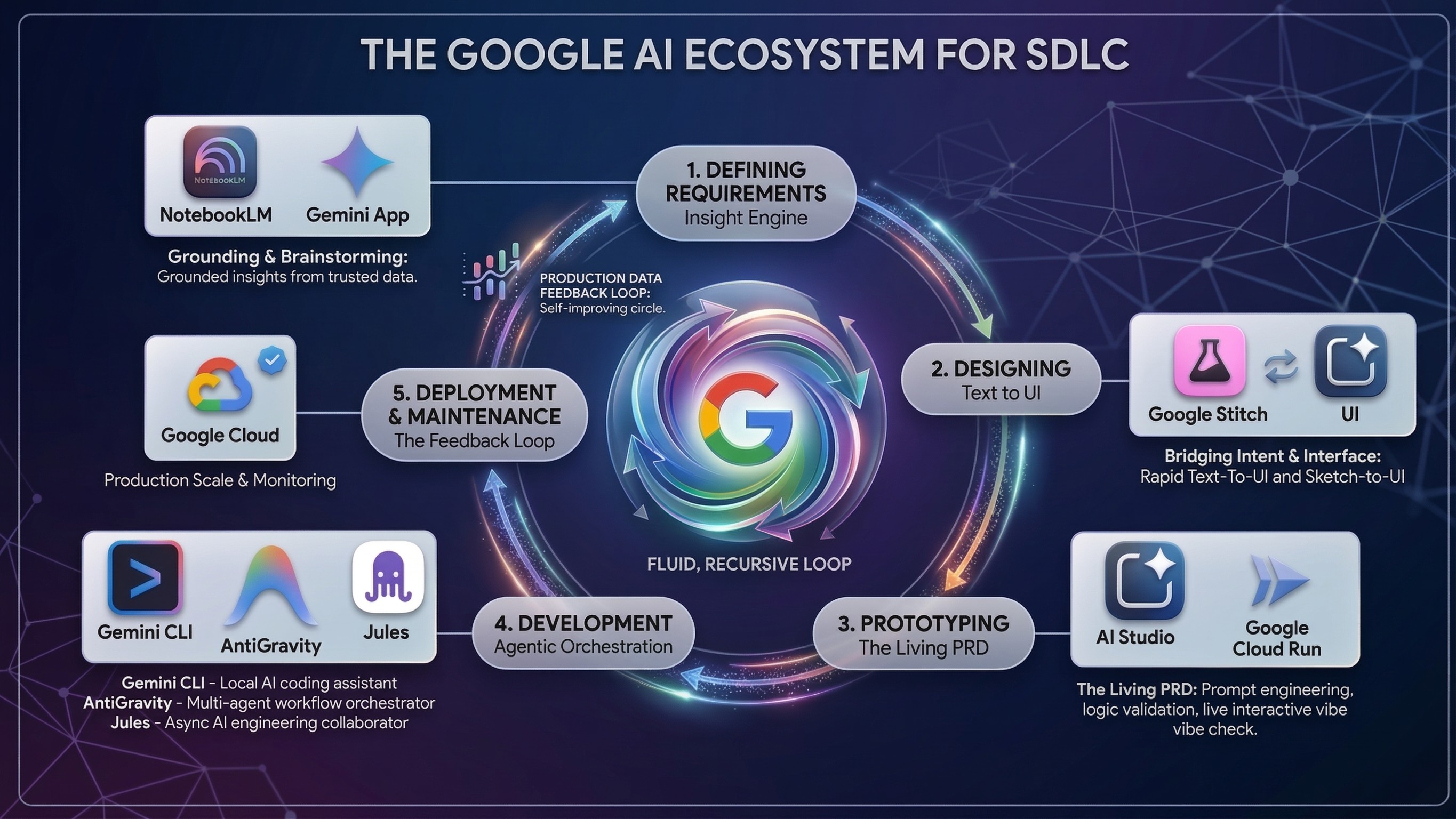
Phase 1: Defining Requirements — The "Insight Engine"
Tooling: Gemini App + NotebookLM
The Shift: Requirements are no longer static lists. They are distilled insights.
The traditional requirements phase is an exercise in entropy. A PM gathers information from a dozen sources—user interviews, analytics dashboards, competitive reports, Slack threads, stakeholder wish lists—and attempts to synthesize it all into a document that is, at best, a snapshot of a moving target. By the time it's reviewed, it's already stale.
The Google ecosystem offers a fundamentally different approach.
Gemini App: The Brainstorming Accelerator
The Gemini App serves as a rapid-fire "blue sky" thinking partner. With its massive context window (Gemini 3 Pro supports over 1 million tokens), a PM can paste in raw interview transcripts, paste a competitor's landing page URL, and ask open-ended questions:
"Based on these five user interviews, what unspoken pain points are users working around?"
"What edge cases would arise if we added offline support to this workflow?"
"Given this competitive landscape, where is the largest unmet need?"
Gemini doesn't just answer—it reasons. With the advanced "Deep Think" mode introduced in 2025, the model considers multiple hypotheses before responding, surfacing edge cases and second-order effects that a human brainstorm might miss under time pressure.
NotebookLM: The Source of Truth
Where Gemini is the engine of ideation, NotebookLM is the engine of verification. Launched as "Project Tailwind" in 2023 and now powered by Gemini 3, NotebookLM has evolved into a full-scale research and content production platform. Its defining feature is source grounding: every answer it gives is tied directly to the documents you upload, with clickable inline citations.
Here's the workflow:
Upload everything: Competitive teardowns, user interview transcripts, analytics exports (CSV), market research PDFs, even YouTube videos of usability sessions. NotebookLM supports up to 50 sources per notebook on the free tier (300+ on paid plans) and can process them within a 1-million-token context window.
Use Deep Research: NotebookLM's agentic Deep Research feature can autonomously search the web, build a bibliography, and compile a citation-backed report—all while you define exactly which sources to trust. As one practitioner noted: "ChatGPT gives you confident answers from sources it chose. NotebookLM gives you confident answers from sources you trust."
Extract themes, not tasks: Instead of writing a bullet list of requirements, the PM asks NotebookLM to synthesize cross-document themes: "Across these 12 user interviews, what are the three most frequently cited frustrations with onboarding?" The output is evidence-based, grounded, and citable.
Generate supporting artifacts: NotebookLM's Studio panel can instantly produce Audio Overviews (AI-generated podcast discussions of your research), Mind Maps, Data Tables, and even Slide Decks—all derived from your uploaded sources. A PM can walk into a stakeholder meeting with a complete briefing, generated in minutes rather than days.
Outcome: A refined, evidence-based product vision built on trusted data rather than gut feeling. The requirements aren't a static document—they're a living, queryable knowledge base that the entire team can interrogate.
Phase 2: Designing — Bridging Visuals and Logic
Tooling: Google Stitch
The Shift: Design moves from "static pixels" to "functional intent."
Historically, the handoff from PM to designer has been one of the leakiest pipes in the SDLC. The PM writes requirements. The designer interprets them into mockups. Misalignment compounds. Rounds of revision ensue. The design tool and the requirements document live in entirely separate universes.
Google Stitch, launched at Google I/O 2025 and significantly evolved by early 2026 into an AI-native design canvas, fundamentally rewires this relationship.
From Prompt to Prototype
Stitch allows anyone—PM, designer, or engineer—to generate high-fidelity UI designs from natural language. But its March 2026 update introduced capabilities that elevate it beyond "vibe design":
An AI-native infinite canvas: Ideas can take any form—images, text, code snippets, screenshots—all placed as context on the canvas. Stitch's design agent reasons across the entire project's evolution, not just the current prompt.
A Design Agent with an Agent Manager: Stitch now includes a design agent that can track progress and work on multiple design directions in parallel. The PM and designer can explore divergent concepts simultaneously and converge on the strongest one.
DESIGN.md: An agent-friendly markdown file that encodes your design system rules—brand colors, component patterns, spacing guidelines—and can be imported/exported across Stitch projects and even into coding tools. This is the design equivalent of NotebookLM's source grounding: it ensures consistency without manual enforcement.
Interactive prototyping: Stitch can "stitch" screens together into working prototypes. Click "Play" to walk through an entire user flow. The AI can even auto-generate logical next screens based on user actions, mapping out journeys effortlessly.
Voice-driven iteration: Speak to the canvas and receive real-time design critiques, alternative layouts, and color palette explorations without breaking creative flow.
The AI-Specific Design Patterns
For PMs building AI-native products—chatbots, multi-modal interfaces, agentic dashboards—Stitch's understanding of streaming states, loading indicators for LLM responses, and multi-modal input patterns (text, voice, image) is particularly valuable. These are interaction patterns that traditional design tools don't natively support.
Seamless Export
Stitch exports to Figma (via paste-to-Figma), to code (HTML + Tailwind CSS), and critically, to AI Studio (preview) and AntiGravity via its MCP server and SDK. This means the design doesn't just inform the code—it flows into it.
Outcome: High-fidelity, interactive layouts that carry the PM's functional intent directly into the prototyping and development phases. The design is no longer a picture of what the product should look like; it's a working specification of how it should behave.
Phase 3: The "Living PRD" — Prototyping & Validation
Tooling: Google AI Studio + Google Cloud Run
The Shift: The PRD is now a functional application, not a document.
This is the phase where the traditional SDLC often suffers its most catastrophic loss of fidelity. The PRD—that carefully crafted document—gets interpreted by engineers who may have never spoken to a user. Assumptions are made. Corners are cut. The product that ships bears only a passing resemblance to the product that was envisioned.
The "Living PRD" eliminates this gap by turning the specification into a working prototype.
AI Studio: The Experimentation Workbench
Google AI Studio has evolved far beyond a simple chat interface. It's now a professional-grade prototyping environment with:
Full Gemini model access: From Gemini 2.5 Flash Light (low-latency, cost-efficient) to Gemini 3.1 Pro (complex reasoning, agentic execution) as well as the latest models for image (gemini-3.1-flash-image-preview), audio (gemini-2.5-pro-preview-tts), music (lyria-3-pro-preview) and video generation (veo-3.1-generate-preview).
Native multimodal inputs: Upload screenshots, PDFs, audio, even YouTube videos as context for generation.
Parameters setting: Grounding tools (Google Search and Google Maps), code execution, structured outputs, temperature, TopK and other.
A full code editor: AI Studio now generates structured applications with file trees, diff views, and version control. It's not generating snippets; it's generating apps.
The workflow for a Living PRD:
Playground Experimentation: Before writing production code, the PM stress-tests prompts in AI Studio to find the "ceiling" of LLM capabilities. Can the model reliably extract structured data from these invoice formats? Can it maintain context across a 20-turn conversation? At what point does it hallucinate? This empirical testing replaces the guesswork that typically plagues AI-feature PRDs.
Prototyping: Using the refined prompts and the Stitch design exports, the PM (or a technical PM) stitches together a functional prototype directly in AI Studio. The Build tab allows creation of standalone applications with integrated tools.
Voice-driven iteration: AI Studio supports "vibe coding" via voice—dictate changes, refine UI, adjust logic conversationally.
Cloud Run: Instant Deployment
Once the prototype works in AI Studio, deploying it for stakeholder validation is a single click. Google Cloud Run's integration with AI Studio allows:
One-click deployment to a stable HTTPS endpoint that auto-scales (including down to zero when not in use).
Secure API key management: Gemini API keys are managed server-side on Cloud Run, not exposed to clients.
Economical hosting: Request-based billing with 100ms granularity and a free tier of 2 million requests per month.
The PM can share a live URL with stakeholders, users, and the dev team. Everyone is interacting with the same functional artifact—not interpreting a document.
Outcome: An "Advanced PRD"—a live environment that proves the value proposition, validates LLM capabilities against real data, and provides the dev team with a working blueprint rather than a wish list.
Phase 4: Development — Agentic Orchestration
Tooling: Gemini CLI, Google AntiGravity, Jules
The Shift: Development evolves from "writing code" to "managing agents."
This is the phase where Google's ecosystem reveals its most ambitious bet: that the future of software development isn't faster typing—it's intelligent delegation.
Gemini CLI: The Terminal-Native Coding Agent
Gemini CLI is Google's open-source AI agent for the command line, and in 2026 it has become one of the most powerful developer tools available:
1-million-token context window: Point it at an entire monorepo and it understands the whole thing.
Plan Mode: Instead of directly editing code, Gemini CLI creates a structured execution plan, waits for approval, then executes—a critical safety feature for production codebases.
MCP integration: Connect to GitHub, databases, Google Search, and custom services for truly agentic workflows.
GEMINI.md: A project-specific configuration file that tells the CLI your coding standards, tech stack, forbidden patterns, and custom workflows—ensuring generated code matches your team's conventions.
For the Living PRD workflow, Gemini CLI provides rapid scaffolding based on the clear requirements and working prototype from Phase 3. The engineer doesn't start from a blank file; they start from a validated prototype with explicit prompt logic and design specifications.
Google AntiGravity: The Multi-Agent Development Platform
Launched November 2025 alongside Gemini 3, AntiGravity is not just an IDE—it's an agentic development platform built on the premise that agents deserve their own dedicated space to work.
Its architecture is defined by two surfaces:
Surface | Purpose |
|---|---|
Editor View | A familiar, VS Code-based IDE with AI-powered tab completions, inline commands, and a side-panel agent—for when you need hands-on control. |
Manager Surface | A mission-control interface where you spawn, orchestrate, and observe multiple agents working asynchronously across different workspaces. |
The Manager Surface is where the PM and Lead Developer shift from writing code to managing agents:
Delegate complex, multi-tool tasks: An agent can autonomously write code, launch the application in the terminal, open a browser, and verify the feature works—all without human intervention.
Review via Artifacts, not logs: Instead of scrolling through raw tool calls, agents produce tangible deliverables—task lists, implementation plans, screenshots, browser recordings. You can leave Google Docs-style comments on any Artifact, and the agent incorporates feedback without stopping.
Multi-agent orchestration: Dispatch different agents to different tasks in parallel. One agent implements a feature while another writes tests and a third updates documentation.
Self-improving knowledge base: Agents save useful context and code snippets to a knowledge base, improving the quality of future tasks.
AntiGravity currently scores 76.2% on SWE-bench Verified and supports multiple models including Gemini 3.1 Pro, Claude Sonnet 4.5, and GPT-OSS—giving teams model optionality based on task requirements.
Jules: The Asynchronous Collaborator
While AntiGravity handles the heavy lifting of feature development, Jules operates as the team's tireless background collaborator. Launched into public beta at Google I/O 2025 and powered by Gemini 3 Pro, Jules is an autonomous coding agent that works asynchronously on GitHub repositories:
Proactive maintenance: Jules' Suggested Tasks feature continuously scans your codebase and proposes improvements—from resolving TODO comments to security patches and accessibility fixes.
Scheduled Tasks: Define a cadence, and Jules performs routine work (dependency checks, weekly housekeeping) on schedule.
Self-healing deployments: The Render integration allows Jules to automatically analyze failed deployment logs, identify issues, write fixes, and open pull requests.
Background work at scale: The team building Stitch itself configured a "pod" of daily Jules agents, each assigned a specific role—performance tuning, security patching, test coverage. Jules became one of the largest contributors to the Stitch repository, freeing the human team for creative problem-solving.
Jules is controlled via the web interface at jules.google.com, through the Jules CLI (for terminal workflows), or programmatically via the Jules API—making it easy to integrate into CI/CD pipelines and custom automation.
Outcome: Drastically reduced development cycles and higher code quality through autonomous verification. The development team's role shifts from writing every line of code to architecting systems, reviewing agent output, and making strategic decisions.
Phase 5: Deployment & Maintenance — The Google Cloud Backbone
Tooling: Google Cloud Platform (GCP)
The Shift: Scaling becomes an extension of the development environment, not a separate discipline.
The prototype that was validated on Cloud Run in Phase 3 has already proven two things: that the product works, and that it runs on Google's infrastructure. Transitioning to a production-grade architecture is an extension of the existing environment, not a migration to a foreign one.
From Prototype to Production
The transition path follows a natural progression:
Cloud Run for initial scale: The prototype deployed in Phase 3 already runs on Cloud Run's serverless infrastructure. For many products, this is sufficient for launch—with automatic scaling, HTTPS, and pay-per-request billing.
GKE for complex workloads: As the product grows, Google Kubernetes Engine provides fine-grained control over container orchestration, with features like the GKE Inference Gateway for AI-specific workloads.
Vertex AI for model management: If the product uses custom or fine-tuned models, Vertex AI provides the full MLOps lifecycle—training, evaluation, deployment, and monitoring.
Serverless vs. Hosted inference: Google Cloud offers both pay-per-token (Model as a Service via Vertex AI or Gemini API) and pay-per-second (self-hosted on Compute Engine, GKE, or Cloud Run with GPUs) options. The choice depends on traffic patterns, cost optimization, and compliance requirements.
The Continuous Feedback Loop
This is where the ecosystem comes full circle. In a traditional SDLC, launch is the end. In the agentic SDLC, launch is the beginning of the next iteration:
User behavior data flows into analytics.
That data is exported and uploaded into NotebookLM as a new source.
The PM queries NotebookLM: "Based on the last 30 days of user session data and these 15 support tickets, what are the top three friction points?"
NotebookLM synthesizes the answer with citations from the actual data.
The PM iterates in Stitch, validates in AI Studio, and the cycle begins again—faster than the first time, because the knowledge base is already built.
Scheduled Jules agents maintain the production codebase in the background—monitoring for dependency vulnerabilities, suggesting performance optimizations, and keeping test coverage high—while the human team focuses on the next version's features.
Outcome: A production-grade deployment that isn't just "shipped and maintained" but is actively learning and improving through continuous, AI-powered feedback loops.
Conclusion: The PM as the New System Architect
The SDLC described in this article is not theoretical. Every tool mentioned—Gemini, NotebookLM, Stitch, AntiGravity, Jules, AI Studio, Cloud Run—is available today. What makes the ecosystem powerful is not any single tool, but the removal of friction points between them:
Traditional Friction Point | Agentic Solution |
|---|---|
Requirements lost in translation | NotebookLM's source-grounded, queryable knowledge base |
Design misinterprets intent | Stitch carries functional context from natural language into interactive prototypes |
PRD ≠ Reality | AI Studio + Cloud Run turns the PRD into a live, testable application |
Slow development cycles | AntiGravity's multi-agent orchestration + Jules' async background work |
Launch-and-forget | Continuous data feedback into NotebookLM for the next iteration |
The Product Manager's role in this ecosystem is fundamentally transformed. They are no longer primarily a document writer. They are a system architect—not of code, but of outcomes. They define the sources of truth. They validate capabilities empirically. They orchestrate agents. They close feedback loops.
This doesn't diminish the role of engineers, designers, or researchers. It amplifies all of them by removing the translation layers that historically degraded signal between disciplines. The designer's intent reaches the code. The PM's evidence reaches the prototype. The user's feedback reaches the next version.
In 2026, the best products aren't just built. They are orchestrated.
The tools are here. The ecosystem is connected. The question is no longer whether AI will reshape the SDLC—it's whether your team will be the one orchestrating it, or the one being disrupted by those who do.
The Google tools referenced in this article—Gemini, NotebookLM, Stitch, AntiGravity, Jules, AI Studio, and Google Cloud Run—are available as of the time of writing. Features and availability may vary by plan and region.
View more articles
Learn actionable strategies, proven workflows, and tips from experts to help your product thrive.