Workflows
Stop Over-Agenting: A 5-Stage Playbook for Matching AI Autonomy to the Workflow
Most AI agent failures aren’t model failures—they’re design mismatches: teams ship too much autonomy for simple jobs (like document summarization) and not enough structure for complex ones (like cross-system execution). This article gives product managers a practical 5-stage progression—from scripted bots to multi-agent orchestration.
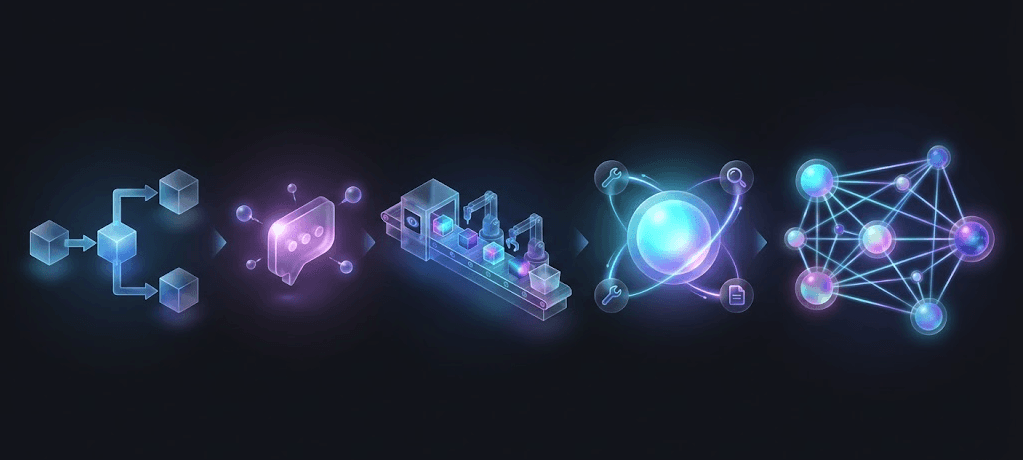
AI Agents Are Powerful Only When Matched to the Right Stage
A practical progression model for product managers designing AI-enabled workflows
The fastest way to burn credibility with “AI agents” is to deploy them where a simpler system would have delivered the same outcome—cheaper, faster, and with fewer failure modes.
What’s happening in many orgs is not a shortage of agent frameworks or workflow tools. It’s a design mismatch: teams pick a level of autonomy that doesn’t fit the job to be done. McKinsey’s recent work on agentic AI is blunt on this point: the value shows up when you reinvent the workflow, not when you bolt an “agent” onto the old process.
At the same time, the market narrative is ahead of reality. Gartner has publicly warned that a large share of agentic AI projects will be scrapped due to cost and unclear business value—often because they’re applied to the wrong problems or justified with fuzzy ROI.
So the product question isn’t: “Can we build an agent?”
It’s: “What stage of automation does this workflow actually need?”
Below is a long-read guide to that progression, what each stage is good for, and how to decide—without getting trapped in “agent washing.”
Why a progression model beats “agent vs non-agent” debates
Most teams talk about AI systems as a binary:
“This is just a chatbot.”
“This is a real agent.”
That framing isn’t useful for product decisions, because real enterprise workflows sit on a spectrum of autonomy, risk, and verification cost.
A better mental model is a maturity ladder where each rung increases:
Autonomy (the system decides what to do next)
Tool power (it can take actions, not just talk)
Statefulness (it remembers context and decisions)
Integration depth (it touches systems of record)
Governance burden (auditability, thresholds, controls)
This ladder also maps to what practitioners have been saying publicly: successful implementations often use simple, composable patterns rather than complex agent frameworks everywhere. Anthropic, for example, explicitly draws a line between deterministic workflows and more open-ended agents—and advises teams to start simpler when tasks are well-defined.
The 5 stages
You outlined five stages in your draft. I’ll keep that structure, but make it “PM-usable”: what it is, when it fits, how to measure success, and what typically breaks.
Stage 1) Script Chatbots (rules + routing)
What it is
Rule-based systems: decision trees, templated replies, hard-coded intents, simple routing.
Where it shines
Stable FAQs
Basic support triage (“billing vs technical”)
Email / ticket categorization
Narrow, predictable flows
Why PMs still ship these in 2026
Because they’re cheaply verifiable. You can test every branch, write deterministic acceptance criteria, and pass audits without probabilistic behavior.
What breaks first
Long-tail user queries
“Partial matches” that look similar but require different outcomes
Content drift (policies change; scripts don’t)
Success metrics
Containment rate (for the exact intents you support)
Deflection without escalations
Average handle time saved
Accuracy of routing / intent classification
PM guidance
Use Stage 1 when the primary goal is consistency and compliance, not user delight.
Stage 2) LLM Chatbots (conversational intelligence, limited agency)
What it is
LLM-powered conversation with retrieval (often) and guardrails. It can explain and summarize well, but it doesn’t reliably plan or execute multi-step work.
Where it shines
Customer support conversations (answering questions, clarifying intent)
Knowledge Q&A over policies, documentation, product guides
Drafting responses with human approval
“Explain this” tasks (onboarding, training content)
What it doesn’t do well
Multi-step execution across tools (unless tightly constrained)
Anything that requires consistent, auditable decisions
Why this stage is often enough
A large fraction of “agent” use cases are actually: “Help a person do a task faster,” not “Do the task end-to-end.” McKinsey’s framing of upgrading copilots into more proactive teammates still assumes workflow redesign and clear boundaries—not autonomous free-for-all.
Success metrics
Answer helpfulness (CSAT-style)
Groundedness / citation rate (if using retrieval)
Hallucination rate (measured on a test set)
Deflection with low re-contact
PM guidance
Treat Stage 2 as a UX layer on top of information, not as automation.
Stage 3) Modern RPA (structured automation + AI-enriched inputs)
What it is
Robotic process automation upgraded with AI capabilities: document understanding, extraction, classification, and integration triggers. The system executes predefined steps, often in enterprise tools.
Where it shines
High-volume, structured workflows: invoices, claims, onboarding packets
Compliance checks where the process is known but inputs vary
Back-office automation where determinism matters
This is why RPA vendors have moved toward “AI-enabled automation” stacks: it matches the enterprise need for governance and repeatability.
What breaks first
Unstructured, ambiguous tasks where the next step is not known
Exceptions that require judgment rather than routing
Success metrics
Straight-through processing rate
Exception rate and handling time
Cost per case
Audit success / error rate in downstream systems
PM guidance
When a workflow is mostly known but the inputs are messy, Stage 3 is a sweet spot: powerful automation without giving the system too much discretion.
Stage 4) Single Agentic AI (planning + tool use in a bounded scope)
What it is
One agent that can:
plan steps
call tools/APIs
use memory (session and/or longer-lived)
incorporate feedback
operate within defined constraints
This is where you move from “assist” to “act.” And that’s where product risk increases sharply.
Where it shines
Research assistants that gather, compare, and synthesize (with citations)
Internal support where the agent can execute bounded actions (e.g., create a Jira ticket, fetch data from a dashboard)
Document retrieval + drafting workflows with approval gates
Semi-autonomous operational tasks with high observability
Why this stage fails in pilots
Teams underestimate:
verification cost
tool error modes
permissions boundaries
audit trail requirements
Gartner’s cautionary signal about many agentic projects being canceled is tightly connected to this: teams overbuild autonomy before they have a crisp value case and operational controls.
Success metrics
Task success rate on a benchmark suite
Tool-call error rate
“Intervention rate” (how often humans must correct)
Latency + cost per completed job
Safety incidents / policy violations
PM guidance
Stage 4 is justified when the workflow is multi-step and the “next best action” depends on context—but the scope is still narrow enough to evaluate rigorously.
Stage 5) Multi-Agentic AI (orchestration of specialists across workflows)
What it is
Multiple agents with specialized roles (planner, researcher, executor, verifier) coordinating via an orchestrator.
Gartner has reported a surge in enterprise interest in multi-agent systems (MAS), precisely because companies want modular specialization rather than one monolithic “super agent.”
Where it shines
End-to-end, cross-system workflows spanning departments
Large-scale orchestration (e.g., incident response, supply chain exception management)
Complex engineering automation (coding + testing + deployment with controls)
What breaks first
State management and handoffs
Conflicting assumptions across agents
Tool contention and rate limits
Debuggability (“Which agent caused the failure?”)
This is why “agent orchestration” is becoming its own concept: coordinating multiple specialized agents in a unified system is not trivial.
Success metrics
End-to-end success rate (not subtask success)
Trace completeness (can you reconstruct decisions?)
Recovery behavior (does it fail safely?)
Operational load (how much human babysitting?)
PM guidance
Stage 5 is not “Stage 4 but more.” It is a systems engineering and governance problem. If you don’t have strong observability and evaluation discipline, you’ll ship something impressive that no one trusts.
Choosing the right stage: a decision rubric PMs can use
Instead of “Let’s build agents,” use these five questions to pick a stage.
1) How deterministic is the workflow?
Highly deterministic (clear steps, few exceptions): Stage 1 or 3
Semi-deterministic (known goal, variable path): Stage 4
Non-deterministic (multiple plausible goals, shifting constraints): stage carefully—often you still want Stage 2 with a human in the loop
2) What is the cost of a wrong action?
A wrong answer is not the same as a wrong action.
Wrong answer → annoyance, re-contact → Stage 2 may be fine
Wrong action → financial loss, compliance incident → Stage 3 or Stage 4 with strict gates
Wrong action at scale → existential risk → Stage 3 or very constrained Stage 4
3) Do you need tool use, or just cognition?
If the job is “understand, summarize, draft,” then the product value may not require autonomy. Anthropic’s guidance to prefer simpler workflow patterns for well-defined tasks is relevant here.
4) Can you evaluate success with a test suite?
If you cannot build a benchmark that approximates real work, your agent will be a demo, not a product.
Easy to label outcomes → Stage 3 or 4 is more feasible
Hard to label outcomes → Stage 2 with UX improvements may outperform “agentic” attempts
5) What permissions can you safely grant?
Many agent failures are actually IAM failures:
overly broad permissions
no separation of duties
inability to prove what happened
If the workflow touches systems of record, design permissions before autonomy.
A mini-case: HR document summarization
Take your example: summarizing HR documents.
Naive approach: “Let’s build an agent that reads policies, answers employees, files updates, and opens tickets.”
Stage-matched approach:
Start with Stage 2 (LLM chatbot) for Q&A + summarization over a curated knowledge base, with citations and a “not sure” fallback.
If HR needs repeatable processing (e.g., extract clauses, classify exceptions), use Stage 3 (Modern RPA + doc AI) to push structured outputs into HRIS.
Only move to Stage 4 if you have a clearly bounded action set (e.g., “create a case in ServiceNow with these fields”) and can measure success and intervention rates.
This approach aligns with what enterprise advisors keep repeating: the workflow redesign and governance matter more than the “agentiness.”
Designing for progression
A common PM mistake is treating stages as separate products. A better approach is to design a workflow that can graduate.
Here’s a practical architecture and product strategy:
A) Separate “decide” from “do”
“Decide” is probabilistic (LLM reasoning)
“Do” should be deterministic (tool execution)
Keep your execution layer predictable, logged, and permissioned.
B) Make every action traceable
If you want trust, you need an audit trail:
inputs retrieved
plan produced
tools called
outputs generated
human interventions
Multi-agent systems make this more important, not less.
C) Introduce autonomy via gates
A simple ladder inside Stage 4:
Suggest actions (human approves)
Execute low-risk actions automatically
Execute medium-risk actions with sampling review
Execute high-risk actions only with explicit approval
D) Measure “verification cost,” not just model cost
Two systems can have the same token bill, but radically different operational cost depending on how often humans must correct outputs or investigate failures—one of the reasons Gartner expects many projects to be canceled.
A practical implementation plan
If you’re a PM kicking off an AI workflow initiative, here’s a sequence that reliably de-risks the work.
Write the workflow as a state machine first
Define stages, inputs, outputs, and “stop conditions.” Don’t start with prompts.Pick the lowest stage that can meet the goal
Ship a Stage 2 or Stage 3 baseline early. Use it to get data.Create a benchmark suite from real artifacts
50–200 representative cases beats 5 impressive demos.Track intervention rate as a first-class metric
If humans still do 60% of the work, your “agent” is a UI, not automation.Only add autonomy after you can observe failures
If you can’t answer “what happened?” from logs, don’t increase autonomy.
The closing bet
Agentic AI is real—and it will reshape parts of enterprise software. Gartner’s public predictions about adoption and impact show how seriously the market is taking it.
But the truth is: many teams are climbing the autonomy ladder in the wrong order, or skipping steps. That’s how you end up with expensive systems that are impressive in demos and brittle in production.
The winning move for product leaders is not “multi-agent everything.”
It’s building stage-appropriate systems that can progress as you earn trust through evidence.
View more articles
Learn actionable strategies, proven workflows, and tips from experts to help your product thrive.